


Life Steps
4.244.00 Reviews
App Specs
- Version
- 2.1.7
- Updated On
- License
- Free
- Downloads
- 10,000+
- Developer
- Support Stream, Inc.
- Categories
- Business
- Platform
- Android
Screenshots
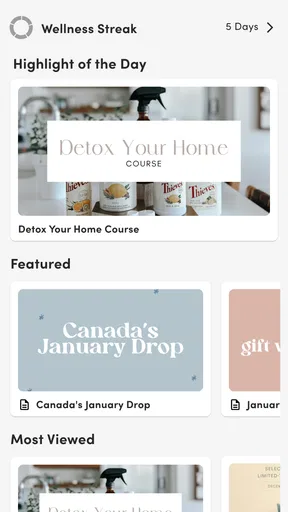

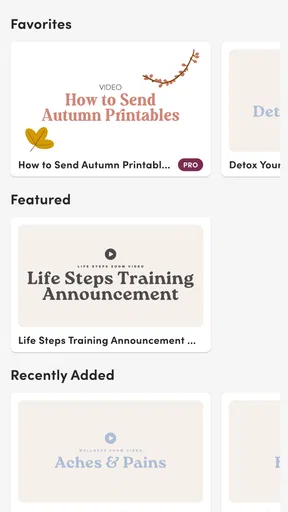
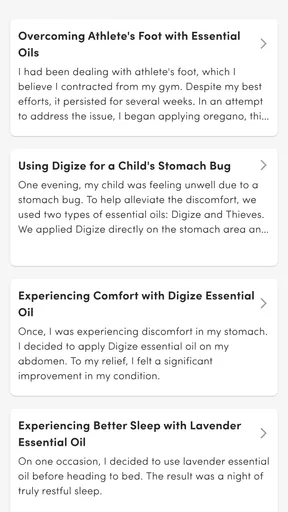




 Analysis by AppCompare
I would first check that you have the right app in mind: Life Steps is a business app from Support Stream, Inc., with a focus on essential oils, health, and Young Living. That makes its name easy to misread. It is not the step counter or workout planner described in the published copy below, so I would not install it expecting walking stats, fitness challenges, or smartwatch syncing. The useful question is whether you want a focused resource around that wellness niche, and whether you are comfortable relying on a mobile app for it.
Where a connection matters most
For a reference-style app, network access can shape the experience in small but important ways: opening material, moving between topics, or checking information when you need it. I would treat Life Steps as something to consult when I have a reliable connection rather than assume every part is available on a plane, in a basement, or during a commute with patchy reception. That is a practical expectation, not a claim about a particular offline mode.
A useful routine is to open the app before you need it, while you still have a steady signal, and locate the pages or subjects you expect to revisit. If you are planning a wellness discussion or comparing products, this lets you find the relevant material calmly instead of trying to search while someone waits. It also reveals early whether the app’s organization suits the way you think.
Better suited to quick mobile checks
Life Steps makes the most sense for someone who already wants Young Living-related health information close at hand. A reader who dips in briefly during the day may find a dedicated app more convenient than reopening browser tabs or sorting through general search results. Its narrow subject focus is a benefit when you know what kind of material you want, but it is also the reason I would not choose it as a broad, neutral health library.
Picture a user preparing for a conversation with a friend who asks about essential oils. Rather than improvising from memory, they can check the app when connected, then take time to consider what they have read. I would still use care with health decisions: informational material is not a substitute for advice from a qualified medical professional, especially when a condition, medication, pregnancy, or a child is involved.
What to do when the app feels slow
If a page takes longer than expected, I would first distinguish a connection issue from an app issue: check whether other apps can load, then try again on a steadier network. Avoid repeatedly tapping controls while a screen is still responding, since that can make it harder to tell whether the first action worked. If the same problem continues, closing and reopening the app is a sensible basic step before deciding it is unusable.
This kind of troubleshooting matters because a compact reference tool is most valuable when it gets out of the way. If you need dependable access at a moment when connectivity is uncertain, keep a trusted alternative available, such as information from a clinician or a source you can access reliably. I would not make a time-sensitive health choice depend on any single app.
Worth Reading Before You Choose

Flipboard Shows What News Apps Must Do Beyond the Feed

Switching to Android Auto Means Rethinking Your Driving Routine

Google Calendar Makes a Crowded Week Easier to Manage

Ludo King Makes the Most of the Minutes Between Plans

Baby Panda World Brings Quick Play to Modern Phones, but Its Game Library Feels Busy

ESPN’s Live Game View Makes Following Close Games Easier
Keep data use intentional
On a limited mobile plan, I would use Wi-Fi for longer browsing where practical and avoid assuming that a page will consume no data simply because it contains text. The app is free to download, but it includes in-app purchases priced from $12.99 to $39.99 per item, so I would look carefully at any purchase prompt and decide whether an added item is relevant before confirming it. A free installation does not mean every optional part has no cost.
Life Steps is rated for Everyone, has a 4.2 average from around 100 ratings, and has been installed over 10,000 times. It first appeared on July 5, 2021; version 2.1.7 requires Android 7.0 or later. Those details make it accessible to many Android users, but they do not tell me whether the app’s particular content matches a person’s needs. I would judge that by opening it and checking whether its focus is useful to me.
Who should choose it—and who should not
I would recommend Life Steps to someone who wants a mobile companion for Young Living and essential-oil-related material, particularly if they prefer a dedicated place to browse rather than a general web search. It is less suitable for readers seeking independent comparisons across many brands, a comprehensive medical reference, or a tool for tracking activity. In those cases, a broader health resource, a clinician, or a dedicated fitness app is a better match.
Compared with a browser, a niche app can make returning to a specific subject feel more direct; a browser, on the other hand, gives you more freedom to compare different publishers and perspectives. That trade-off is worth keeping in mind. I would use Life Steps as one convenient starting point, not as the final authority on a health question or a reason to buy a product.
Before settling in, I would check whether the app’s content is current enough for the question I have, whether the sections are easy to find, and whether any paid item offers something I actually want. Those checks answer the practical questions that matter: Is it useful for my interests? Can I reach the information when I need it? Am I comfortable with the cost of optional content? If the answers are yes, its focused approach may suit you.
Have you ever wished for a personal assistant that keeps track of your daily steps, workouts, and even offers motivational nudges? Well, that's exactly what Life Steps aims to do. I recently downloaded this nifty app, and let me tell you, it's been quite the journey. Here's my take on how Life Steps can be your new best friend in the world of fitness and wellness.
First Impressions: Sleek and Simple Interface
Right off the bat, the first thing that struck me was its clean and user-friendly interface. You don't need to be a tech wizard to navigate through the app. The icons are intuitive, and everything is neatly organized. This simplicity is a huge win for anyone who might feel overwhelmed by more complex fitness apps.
Upon installation, I was prompted to set up a profile. It asked for basic details like age, weight, and height. This personalization is crucial as it helps the app tailor its features to your specific needs. Once you're set up, you're greeted with a dashboard that shows your daily step count, calories burned, and distance traveled. It's a one-stop-shop for all your movement metrics.
Motivation on Tap
One of the standout features of Life Steps is its motivational tools. The app sends you gentle reminders to get up and move, which is perfect for those of us who spend too many hours glued to our office chairs. These reminders are not too pushy and come with encouraging messages that genuinely make you want to hit your step goals.
Additionally, there are daily challenges and streaks to keep you engaged. Who doesn't love a little competition, right? Whether it's a simple 5,000 steps a day goal or a more intense workout challenge, the app has got you covered.
Integration and Compatibility
Now, what truly sets Life Steps apart from other fitness apps is its seamless integration with other devices. It syncs effortlessly with smartwatches and fitness trackers. This means all your data is consolidated in one place, making it easier to track your progress over time.
Moreover, the app is compatible with both Android and iOS, which is a relief for those of us who switch between devices. It's always a hassle when an app is only available on one platform, but thankfully, that's not the case here.
Custom Workouts and Plans
Feeling like stepping up your fitness game? Life Steps has a variety of workouts and plans to suit everyone's needs. Whether you're a beginner looking for light exercises or an athlete seeking intense training sessions, there's something for you. The app provides video tutorials and detailed descriptions to ensure you're performing exercises correctly, minimizing the risk of injury.
There's also a feature that lets you create your own workout routines. This customization is perfect for those who prefer a more tailored approach to their fitness regime.
Community and Social Features
If you're someone who thrives on social interaction, you'll love the community aspect of Life Steps. You can connect with friends, join groups, and even participate in community challenges. Sharing your progress and achievements with others can be a powerful motivator.
The app also allows you to share your milestones on social media, letting you bask in the glory of your fitness achievements. It's a fantastic way to stay accountable and inspire others in your network to join the fitness journey.
Privacy and Security
In this age where data privacy is a significant concern, Life Steps takes user security seriously. The app assures users that their data is encrypted and not shared with third parties without consent. This level of transparency is reassuring and adds an extra layer of trust.
The privacy controls are straightforward, allowing you to decide what information you want to share and with whom. It's comforting to know that your data is safe while you're busy smashing your step goals.
All in all, Life Steps is more than just a step tracker. It's a comprehensive fitness companion designed to cater to all aspects of your physical well-being. Whether you're just starting on your fitness journey or looking to maintain an already active lifestyle, this app has something for everyone. With its blend of motivation, community, and personalized plans, it's a fantastic tool to have in your fitness arsenal. So, why not give it a shot and take a step towards a healthier you?
Pros
- Intuitive user interface enhances usability.
- Wide range of health and fitness features.
- Customizable notifications for reminders.
- Integrates with popular fitness trackers.
- Detailed progress tracking and analytics.
Cons
- Limited free version with few features.
- Occasional sync issues with some devices.
- Requires constant internet connection.
- In-app ads can be intrusive at times.
- Data export options are quite limited.
FAQs for Life Steps
What is Life Steps and how does it work?
Life Steps is a health and fitness app designed to help users track their daily steps, monitor physical activity, and set personalized fitness goals. It uses your device's built-in sensors to record your steps and provides detailed statistics and insights to keep you motivated. Whether you're walking, running, or cycling, Life Steps ensures you stay on top of your fitness journey.
Is Life Steps compatible with all devices?
Life Steps is compatible with both Android and iOS devices. However, it requires your device to have built-in motion sensors to accurately track your steps and other activities. Make sure your device's operating system is up-to-date to ensure optimal performance of the app's features.
Does Life Steps require an internet connection to function?
Life Steps can operate offline to track your steps and basic activities. However, to access advanced features such as syncing data across devices, receiving updates, or using cloud storage, an internet connection is necessary. This ensures you have the most accurate and comprehensive view of your fitness progress.
Are there any in-app purchases or subscriptions in Life Steps?
Life Steps offers a free version with basic features. For users seeking a more personalized and detailed experience, there are optional in-app purchases and subscription plans. These may include advanced analytics, personalized coaching, and ad-free usage, providing a more enhanced fitness journey.
How does Life Steps ensure user privacy and data security?
Life Steps prioritizes user privacy by implementing robust security measures to protect your data. All personal information and activity data are encrypted and stored securely. Users have control over their data, with options to manage permissions and privacy settings, ensuring you can use the app with confidence.


